Beyond the Prompt: How an Infinite Canvas Makes AI Visual Creation Easier
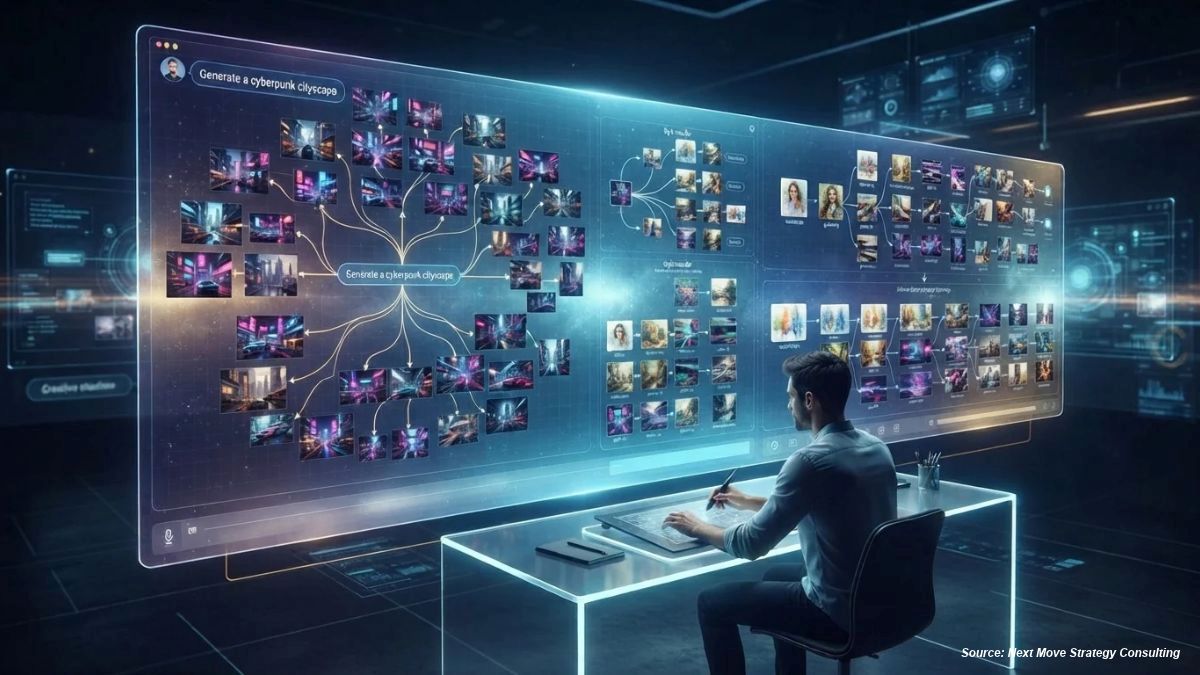
Creating visuals with AI is exciting, but managing everything afterwards can become complicated. Photos, videos, edits, and source files can easily be mixed up in various discussions. It can be time-consuming to locate the appropriate version or revert back to a previous idea. This can interrupt the creative process, especially when working on larger projects.
A more structured approach to this process is provided by an Infinite Canvas. It brings AI-generated visuals, editing tools, and creative assets into one workspace. Rather than browsing lengthy chat logs or dashboarding between various tools, creators can view and manipulate their visual work all in a single location. This simplifies the process of generating ideas, making changes, and sustaining creative projects.
What Is an Infinite Canvas in AI Visual Creation?
An Infinite Canvas is an exclusive visual studio where creators have access to AI-generated images and videos. It integrates with the chat interface, giving you an additional space to see, organise, and edit creative works. This will provide users with a better picture of their projects without totally depending on conversation history.
The workspace also relates to the presence of visual assets and AI interactions. Authors are able to choose and use already existing pictures as a reference for new prompts, and receive variants of their work. An Infinite Canvas is not about an individual generation; instead, it attempts to unite various phases of visual production.
Five Ways an Infinite Canvas Improves the Creative Workflow
1. Keep Every Visual Within Reach With a Dedicated Workspace
It is easy to work with several AI-generated images and videos when the specific results may not be found. An Infinite Canvas solves this issue by providing a special visual panel that is placed next to the chat. It unites created images into a single convenient space, and a person does not have to scroll through long dialogues.
The setup is especially useful in projects involving multiple images, video clips, or creative variations. Users are able to access their assets and organise them in the same workspace. With everything in sight, it is easier to follow up on progress and go back to earlier ideas. It also brings a narrower working environment since creators do not have to lose track of the conversation when managing their visual material.
2. Refine Your Ideas With Built-In AI Editing Tools
Making an image can be only the start. In some cases, there is a need to change the background or remove an undesired object or provide more space in an image. All these adjustments can be facilitated by an in-built artificial intelligence editing tool that introduces various editing tools into the canvas.
The tools on offer include a few general editing requirements. Regenerate generates new variants of an existing output, and Upscale enhances image resolution. Outpaint expands an image beyond its original boundaries. The Erase button removes unwanted content, and the Background Removal button removes the subject from the background. AI Edit is an aid to visual change with AI-assisted editing. All these options assist creators in optimising work, without having to switch back and forth between separate programs. They are able to make changes, assess the outcomes, and proceed with the formulation of their concepts in the same workspace.
3. Give AI Agents Visual Context Through Seamless Integration
Explaining a visual idea through text alone can sometimes be difficult. An AI agent may be requested by a creator to adhere to a specific design, receive an existing image to guide them, or learn about a series of visual references and then create a new one.
This process becomes easier with an Infinite Canvas. Individual or multiple canvas nodes can be selected by the user and directly referenced in the chat input. These selected assets provide visual context for follow-up prompts. To illustrate, when making a request to modify a visual, an artist can use an image that already exists. This minimises the possibility of having to repeat all those details. It is also useful to ensure continuity among various phases of a project, which makes the communication with AI agents more related to the current work of the creator.
4. Explore Different Versions Without Losing Original Work
Building on creative projects seldom happens in a single attempt. Even a picture can go through a series of changes before it coincides with the initial thought. Nonetheless, it can be challenging to experiment with variations once new edits overlay the old outcomes.
Non-destructive version control can be used to avoid this problem. Every edit creates a new canvas node instead of overwriting the original asset. This allows creators to retain previous versions as they strive to follow different creative paths. They are also capable of juxtaposing the results to determine which edition is best.
This would allow users to be more experimental. In case the new edit fails to achieve the desired outcome, the original is retained. Having a visual history also makes it easier to follow changes throughout a project. Artists do not need to be afraid of losing the work they already do since they can experiment with new concepts.
5. Organise Creative Assets With Flexible Canvas Controls
A creative project may include uploaded images, AI-generated videos, reference files, and other visual materials. It will be easier to manage these assets when there are flexible options for organising the workspace.
An Infinite Canvas enables creators to add uploaded files, task elements, and web images to the same space. They are capable of drag-and-dropping materials into layouts, auto-aligning items, and scaling their size. Common actions are also made more convenient by keyboard shortcuts. When it comes to working with multiple files, batch downloading offers a convenient means of storing multiple assets.
These characteristics allow users more freedom to customise the appearance and functionality of their workspace. They are able to organise visual materials in the way they wish, store related objects in a cluster, and operate various aspects of a project more easily. This can particularly be helpful when a creative assignment has multiple references and visual variants.
Why a Connected Visual Workspace Matters for AI Creators
An integrated work environment will have a tangible impact on daily creative work. Creators do not need to waste time on the process of finding old outputs, as their visuals can be easily organised and accessed. Built-in editing tools also make it easier to refine ideas without interrupting the workflow.
However, more significantly, a visual asset connection to AI agents provides a more seamless method of elaborating existing ideas. Creators are also able to use the image as a reference and experiment with different versions and also keep a clear history of their alterations. Having these activities interlinked can help designers, marketers, content producers, and visual storytellers. Instead of viewing generation, editing, and organisation as distinct process areas, they can consider them as stages of a unified creative process.
Frequently Asked Questions
What is Infinite Canvas in AI?
Infinite Canvas is a workspace that allows managing AI-generated images, videos, and other creative works. It assists users in organising, viewing and editing their work in a single place.
Can you edit AI-generated images directly on an Infinite Canvas?
Yes. Editing tools are offered, such as regeneration, upscaling, outpainting, erasing, background removal, and AI-assisted editing. These actions allow a user to weed out images in the workstation.
How does version control help in AI visual creation?
Non-destructive version control leaves secondary assets intact during editing. Every new version stays, and it becomes a bit simpler to compare the results and consider various creative options.
About the Author
 Sanyukta Deb
— Sanyukta Deb is Digital Marketing Team Lead at Next Move Strategy Consulting, where she has led content strategy and technical SEO for the firm's B2B market research publications for over 2 years. Her editorial process translates NextMSC's primary and secondary research — spanning technology, industrial, and consumer sectors — into commercial narratives, backed by search-intent, keyword, and competitive analysis. She brings 5 years of overall experience in digital marketing and content strategy.
About the Reviewer
 Debashree Dey
— Debashree Dey is Assistant Manager at Next Move Strategy Consulting, where she supports cross-vertical market content and communications across diverse industries for 6 years. Her professional background includes senior content writing, communications, and published manuscript authorship, with experience developing audience-focused business narratives and maintaining clear, consistent messaging. Her role supports research-led content development and editorial quality across NextMSC publications.











Add Comment